The MULTILOOKUP function makes it easy to perform two-dimensional lookups and return the value at the intersection of a row and column using a single, clean formula. MULTILOOKUP works similar to XLOOKUP but supports multiple criteria.
In this guide, we’ll show how to use MULTILOOKUP for two-way lookups and share live examples in a Row Zero spreadsheet.
What is MULTILOOKUP?
MULTILOOKUP is a spreadsheet function that lets you look up and return a value based on multiple criteria.
The MULTILOOKUP function uses the following syntax:
=MULTILOOKUP(return_range, key_range1, key1, [key_range2], [key2], ...)
The first 3 arguments are required:
- return_range is the range of cells containing the corresponding values you want to return.
- key_range is the range of cells where you want to perform the lookup.
- key is the key value you want to find.
You can add as many key_range and key pairs as you'd like to lookup across multiple criteria. Additionally, you can lookup across a row and a column at the same time to find the intersecting value.
How to look up values by row and column
MULTILOOKUP makes it easy to lookup values by row and column and also supports multiple criteria. In the example below, we can look up the inventory by month by supplier:
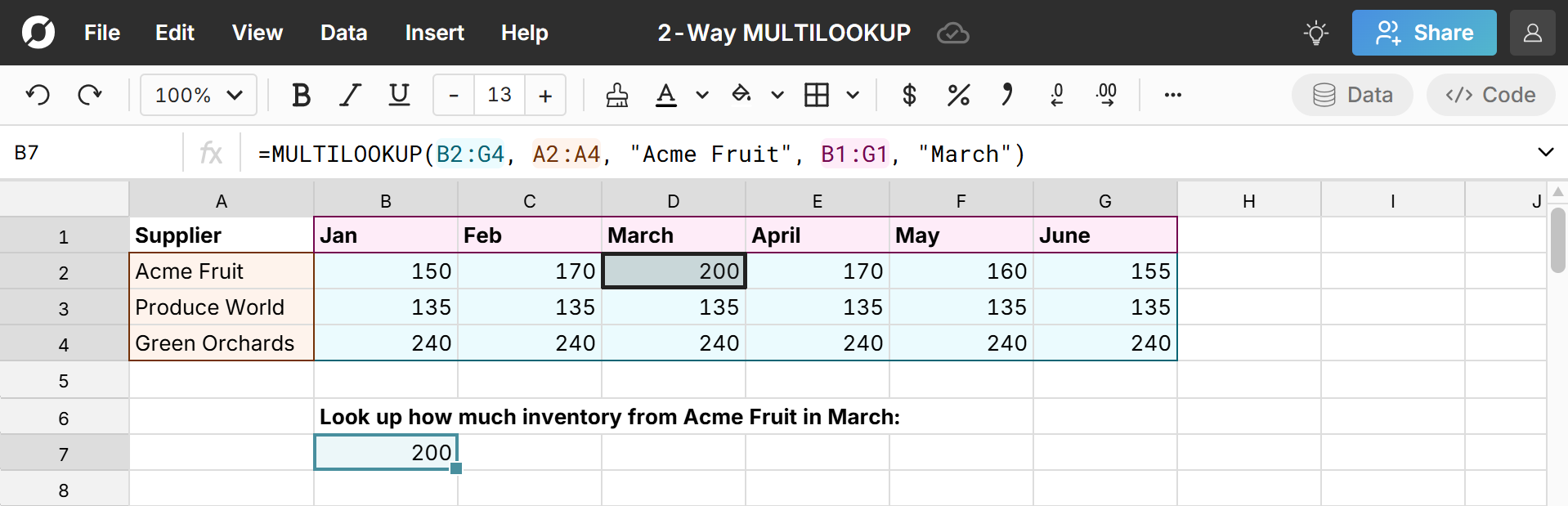
The formula is =MULTILOOKUP(B2:G4, A2:A4, "Acme Fruit", B1:G1, "March")
The formula looks for "Acme Fruit" in column A (A2:A4) and "March" in row 1 (B1:G1) and returns the intersecting value in the return range B2:G4 of 200.
As we see in the next example, you can look up intersecting values based on many criteria. Here we add an additional column for "Product" and now look up the number of Apples from Acme Fruit in March.
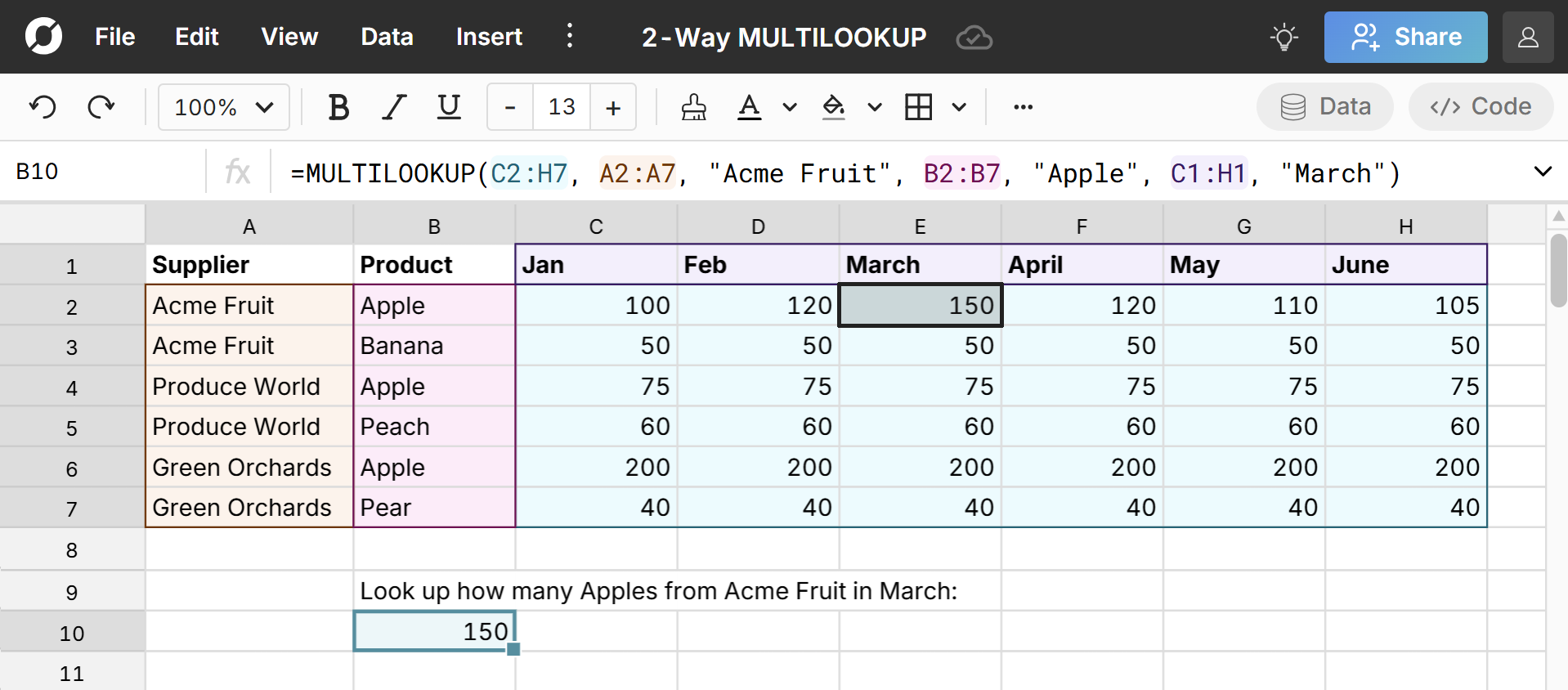
The logic is the same, we've just added another set of criteria.
Here's an example of how MULTILOOKUP replaces more complex nested INDEX + MATCH + MATCH formulas:
What MULTILOOKUP replaces
MULTILOOKUP formulas make it possible to look up values by row and column and/or multiple criteria in a simple, clean formula and eliminate the need for:
- INDEX + MATCH + MATCH - Classic but complicated and hard to maintain.
- Nested XLOOKUPs - Readable only to advanced spreadsheet users.
- VLOOKUP workarounds - Often require reshaping data.
- Helper columns - Messy and fragile.
- Pivot tables for simple retrieval - Overkill when you just need one value.
The MULTILOOKUP function has several advantages over these legacy solutions:
- Faster to write - One formula instead of three.
- Easier to maintain - Clear logic = fewer errors.
- Easier to audit - Simple to understand what it’s doing.
- More powerful - Supports multiple row criteria and column matching together.
- Built for real datasets - Modern datasets are multi-dimensional. MULTILOOKUP matches that reality.
Common use cases for two-way lookups
Two-way lookups are commonly used any time you want to lookup values in a 2D table (i.e. you want to look up by row and column at the same time). Here are some common use cases for two-way lookups:
- Financial models - Often look up values from scenario tables, forecast matrices, pricing tables, etc. For example, return the forecast for Product A in June under Scenario B.
- Sales and revenue reporting - Common lookups include rep performance by month, region by product, account by quarter, etc. For example, find revenue in the East region in June.
- Headcount and workforce planning - Common lookups include salary bands by job, budgets by department, and headcount by month. For example, lookup headcount for engineering in June.
- Data warehouse imports - Common lookups include metrics by dimension + time. This is especially powerful when working with large connected spreadsheets in Row Zero.
Conclusion
Finding the value at the intersection of a row and column is a very common use case that has historically required complex, nested formulas or workarounds to solve. The MULTILOOKUP function makes it easy to do two-way lookups and/or lookup across multiple criteria. Try it out in our example spreadsheet.
Frequently Asked Questions
The MULTILOOKUP function lets you look up values based on multiple criteria and supports 2-way lookups across rows and columns.
The MULTILOOKUP formula is =MULTILOOKUP(return_range, key_range1, key1, [key_range2], [key2], ...).
The MULTILOOKUP function makes it easy to lookup values by row and column and supports multiple criteria. Beyond MULTILOOKUP, you can use INDEX + MATCH + MATCH formulas or nested XLOOKUPs to lookup intersecting values.