Spreadsheets are the most popular data tool and increasingly, online spreadsheets are preferred over desktop spreadsheets thanks to their collaboration features, big data power, cloud security, and integration with cloud data sources. Today's best online spreadsheets are way more than just Excel online. Row Zero is a 1000x more powerful spreadsheet with built-in connectors to cloud data sources and advanced enterprise security features. Google Sheets is the most popular online spreadsheet and introduced real-time collaboration and sharing to spreadsheets. And if you do just want Excel online, Excel 365 is the online version of Excel.
The best online spreadsheet for you will depend on your needs. In this guide, we'll review the 3 best online spreadsheets - Row Zero vs Google Sheets vs Excel Online (Excel 365) and compare across features. Skip to a section below or continue for the full guide.
What is Row Zero?
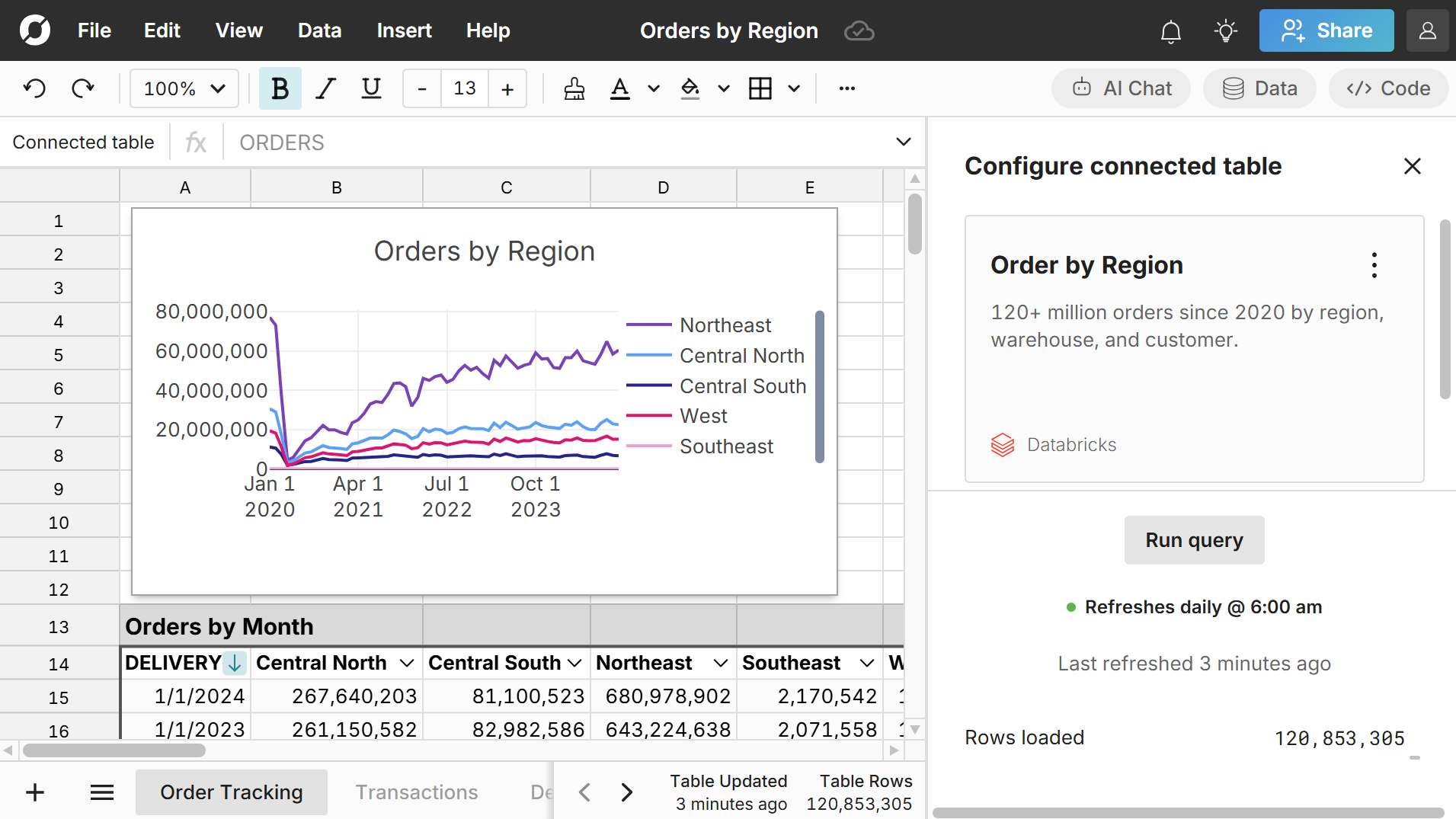
Row Zero is a cloud spreadsheet built for modern enterprise data. It works like Excel but supports 1000x bigger data than Excel’s limits and securely connects to your data warehouse, so teams can easily build connected spreadsheets that auto-update. Row Zero matches the experience of Excel and Google Sheets, so it is a great alternative to Excel and Google Sheets replacement for big data users.
Why Choose Row Zero
Row Zero offers several unique advantages over traditional spreadsheets:
- Big data power and speed to handle 1000x bigger datasets and heavy computations
- Built-in data connectors to your data sources to streamline import, automate data updates, and enable dynamic analysis, reports, dashboards, etc.
- Enterprise-grade security that significantly improves spreadsheet data governance
- Powerful AI spreadsheet assistant that leverages spreadsheet functions and features to analyze massive datasets with natural language prompts.
- Support for large file formats - open and edit big CSVs, parquet, JSONL, .gz, etc.
What is Google Sheets?
Google Sheets is a free, cloud-based spreadsheet application that is part of the Google Workspace suite (Google Docs, Slides, etc.). Users can create, edit, and share spreadsheets in real-time. Google Sheets is highly accessible, requiring only a Google account and an internet connection. Google Sheets has all of the core spreadsheet features including formulas, charts, pivot tables, and conditional formatting, along with advanced features like custom scripting through Google Apps Script. Its seamless integration with other Google Workspace tools, like Google Drive and Google Docs, makes it a versatile web-based spreadsheet option for individuals and teams.
Why Choose Google Sheets
If you are already a Google user and don't need to work with big datasets or connect live to data sources, then Google Sheets is probably the best online spreadsheet for you and at the very least, should be the first online spreadsheet you try.
What is Excel 365 (Excel online)?
Excel 365 is Microsoft’s online version of Excel. Excel online has many core features of the traditional Excel desktop application like formulas, charts, pivot tables, filter/sort, and formatting. Like Google Sheets, users can create, edit, and collaborate on spreadsheets through a web browser without the need for installation. While it doesn’t include some of the advanced features found in the desktop Excel, its integration with OneDrive and other Microsoft 365 apps (Powerpoint, Word, etc.) makes it a convenient and collaborative web-based spreadsheet for teams and businesses.
Why Choose Excel 365
If you like using desktop Excel and just want Excel online, then Excel 365 will be a seamless transition.
Best Spreadsheet by Category:
Most popular online spreadsheet - Google Sheets
Google Sheets is the most popular online spreadsheet and has been since it's inception in 2006 thanks to its seamless integration with other Google products, ease of use, and general Excel-compatibility.
Best spreadsheet for big data - Row Zero
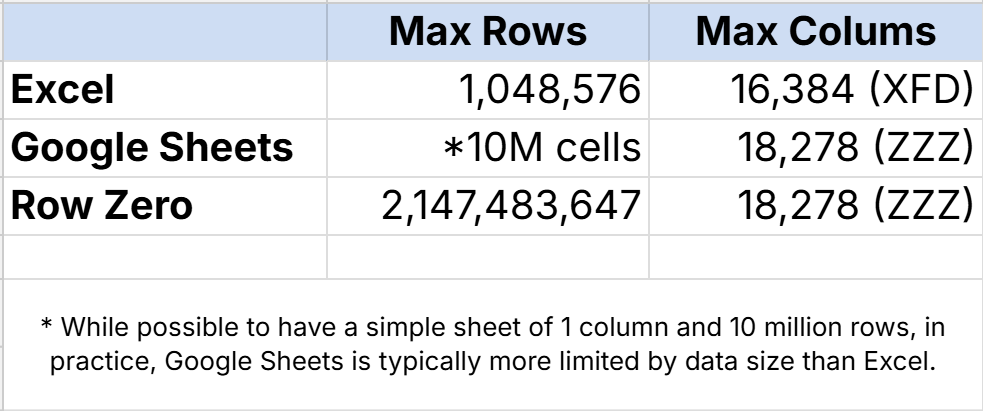
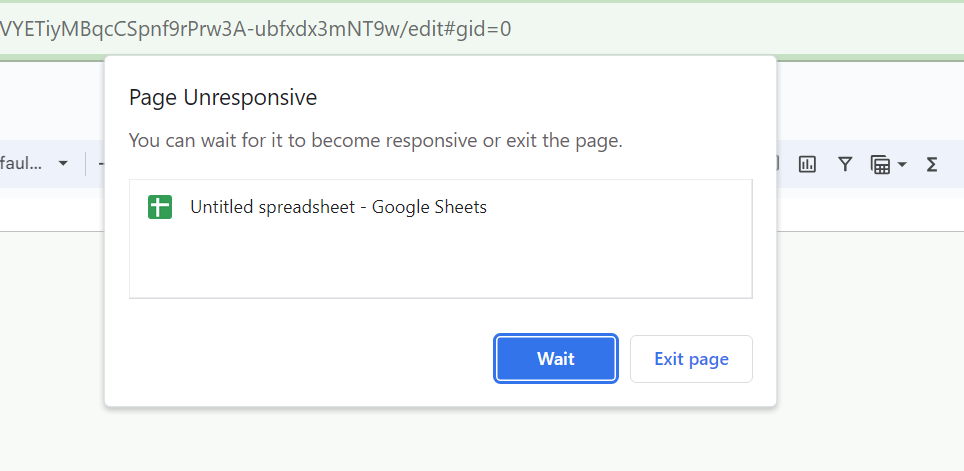
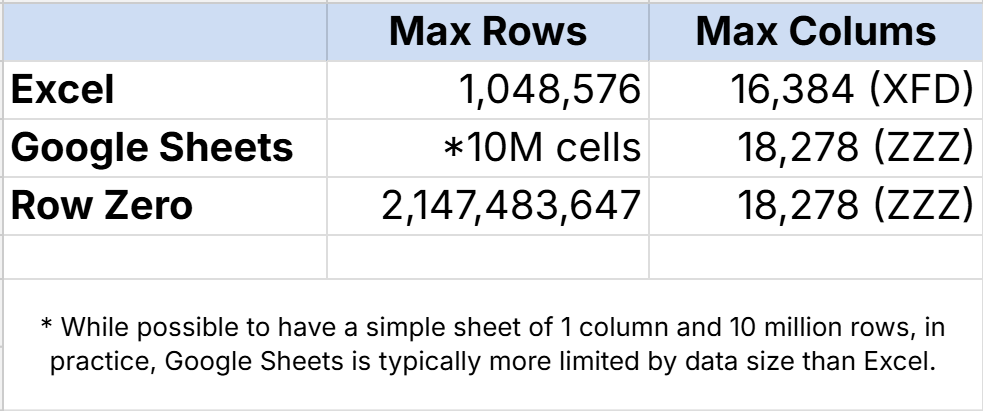
Row Zero is specifically engineered for big data and is 1000x more powerful than traditional spreadsheets. Row Zero works like Excel and Google Sheets, so when Excel users hit performance issues or approach the Excel row limit (1,048,576 rows), Row Zero is a great Excel alternative for big data users. Same for Google Sheets users hitting performance issues or approaching the data limits of Google Sheets (10 million cells).
Best spreadsheet for security and data governance - Row Zero
Row Zero is designed for enterprise security and data governance. For enterprises, users can login with single sign-on (SSO) and connect directly to a "source of truth" data warehouse or database. Companies can eliminate ungoverned downloads, locally stored files, and untraceable email attachments. Organizations can also choose to restrict data export, restrict external sharing, and enforce data lifecycle rules. Row Zero is SOC 2 Type II Certified, GDPR compliant, and HIPAA compliant. See 10 ways Row Zero improves data governance and security.
Best spreadsheet for data analysis
- Dynamic, big data analysis - Row Zero: Row Zero can handle 1000x bigger datasets than traditional spreadsheets and has a native python window that lets you import python packages like pandas, numpy, and scipy. When you connect to your data source, everything you build on connected data stays in sync and updates as source data is updated, so you can build dynamic analysis and auto-updating pivot tables, charts, and dashboards. If you want to analyze more than 1 million rows in your spreadsheet, Row Zero is the best choice.
- Statistical analysis on smaller datasets - Excel or Google Sheets plus add-ins: Excel online has a wealth of formulas and features for statistical analysis (e.g. TTEST) and Google Sheets has many of these as well. In addition, each have an add-on marketplace where you can find specific add-ons for different types of statistical analysis and data visualizations.
Best spreadsheet for collaboration
- Smaller datasets - Google Sheets: Google Sheets invented real-time spreadsheet collaboration and continues to be best in class for multi-user collaboration, assuming your datasets are in the thousands of rows or less.
- Larger datasets - Row Zero: Row Zero offers similar real-time collaboration features and supports much larger datasets, so once your data is over 100K rows, Row Zero is the better choice for collaboration.
Best enterprise-grade spreadsheet - Row Zero
Row Zero is an enterprise-grade spreadsheet that is purpose-built for big data and enterprise security. As the world's most powerful spreadsheet, Row Zero enables billion row spreadsheets on Enterprise plans with built-in connections to data warehouses (Snowflake, Databricks, Redshift, Oracle, BigQuery), Postgres, and Amazon S3 . Enterprise plans support single sign-on (SSO) and offer several advanced security features for enterprises.
Best free online spreadsheet - depends on your needs
Row Zero, Google Sheets, and Excel all offer a free spreadsheet online and the free version has many of the core features of each spreadsheet application. The best free spreadsheet application for you will depend on your needs. For big data needs, the processing power, speed, and data connectivity in the free version of Row Zero far exceeds any version of Excel and Google Sheets. If you typically use Excel and just want to use Excel online, then Excel 365 is a good option. If you don't need to work with big data and already have a Google account (gmail, youtube, etc.), then Google Sheets is an easy online spreadsheet for you. While each of these spreadsheets are free for personal or basic use, enterprise usage will require a paid plan.
Best spreadsheet for python - Row Zero
Row Zero has a built-in Python code window that lets you write custom spreadsheet functions with Python and import popular Python packages like pandas, numpy, and scipy.
Best online spreadsheet for Excel compatibility - Excel 365
If you want to most fully match desktop Excel and just access your Excel spreadsheet online, then Excel 365 is your best choice. While Row Zero and Google Sheets are generally Excel-compatible and allow you to import XLSX files, neither are 100% compatible so obscure formulas, some types of formatting, and some advanced features like Macros or VBA won’t always convert fully. Google Sheets is next most compatible and allows you to download as an XLSX, so if you're looking for an Excel editor online that lets you re-download as XLSX, Google Sheets is your next best choice.
Best spreadsheet for data connectors
- Small datasets - Google Sheets + Coefficient: If you don't work with large datasets and want to be able to connect to several different data sources like Salesforce, Hubspot, Stripe, Quickbooks, etc., you can purchase a Google Sheets add-in like Coefficient to streamline data connectors. Here's a review of Coefficient features.
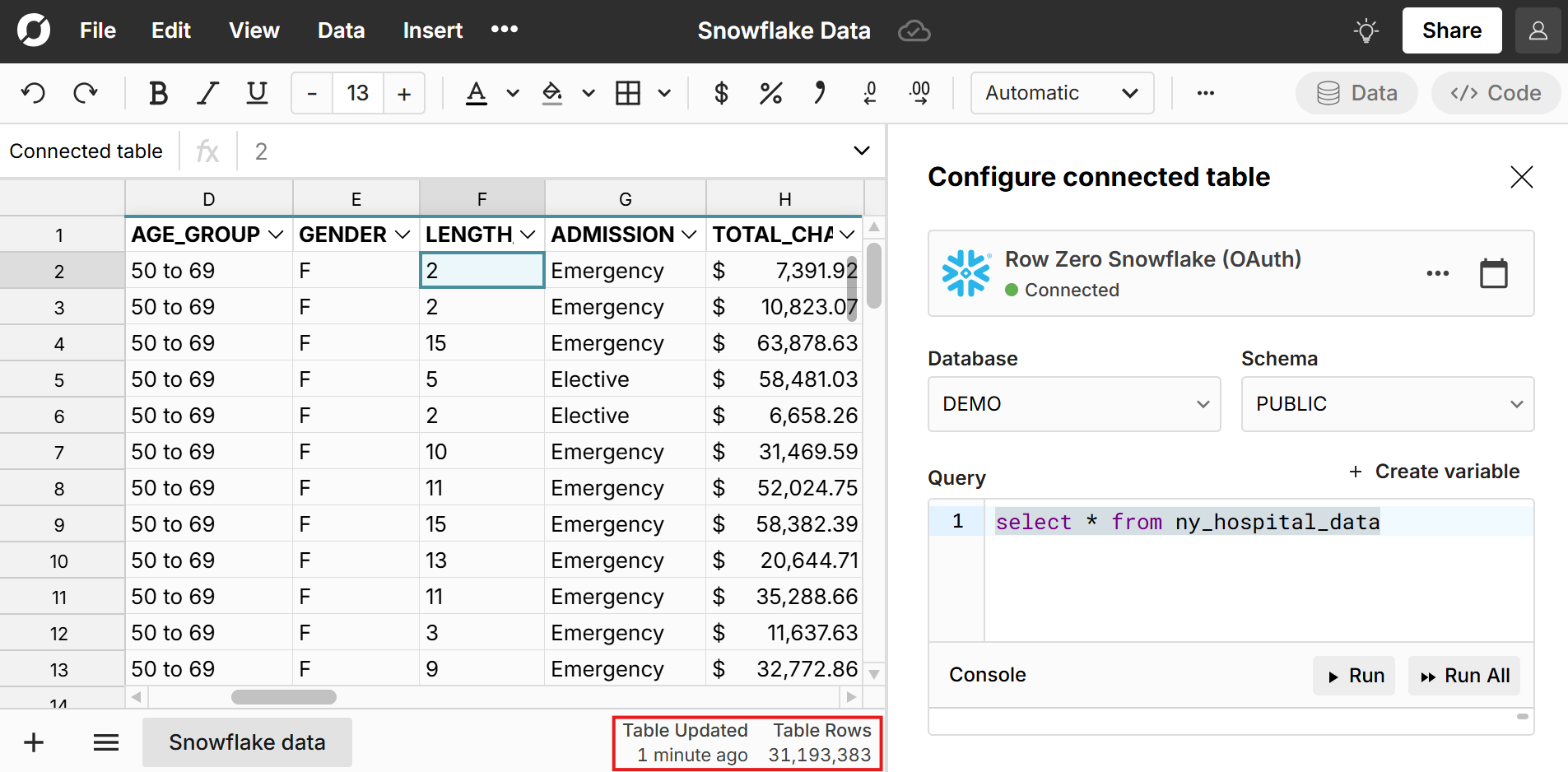
- Big datasets - Row Zero: If you work with large datasets and/or want to connect directly to your central data warehouse or database, Row Zero is your best choice. You can import large datasets, have room to transform and analyze the data, and dynamically update everything built on top of source data with manual or scheduled refresh. And data connectors are native to the spreadsheet app. You don't have to purchase any add-ons.
Best spreadsheet for big file formats (parquet, JSONL, .gz) - Row Zero
Row Zero seamlessly opens large file formats like parquet and JSONL, and automatically unzips and opens .gz and other compressed files. Row Zero also has the capacity to handle the large datasets stored in these formats and similarly makes it easy to open large CSV files online.
Best spreadsheet GUI for database / data warehouse - Row Zero
Spreadsheets are commonly used as a GUI to view, edit, and analyze data in a database or data warehouse. Historically, this involved writing a SQL query, downloading a CSV, and opening in Excel or Google Sheets. Row Zero streamlines this process by securely connecting directly to your database or data warehouse. It's also powerful enough to pull entire data tables into your spreadsheet to explore, filter, sort, pivot, chart, etc. so you can spend less time writing and re-writing SQL statements and waiting for queries and more time dynamically exploring the data in a spreadsheet.
Advantages of online spreadsheets
If you're still using desktop Excel or Libre Office, there are several reasons why you may want to switch to an online spreadsheet:
- Real-time collaboration: Online spreadsheets enable real-time collaboration. Multiple users can edit the same spreadsheet simultaneously while changes are reflected in real-time.
- Accessibility: Web-based spreadsheets are accessible from any device with an internet connection and easily shareable with colleagues. They're also cross-platform compatible and will work from Windows, MacOS, Linux, and mobile devices.
- Faster, more powerful spreadsheets: Next-gen cloud spreadsheets like Row Zero are specifically engineered for performance and utilize powerful cloud computing that scales with your data needs and are much faster and more powerful than traditional spreadsheets. Unlike desktop spreadsheets, you are not restricted by the processing power of your computer.
- Automatic updates and backups: Unlike desktop software that can get out of date or require updates, online spreadsheets are automatically always up to date with the latest features and security. They also include automatic backups and version tracking to view and restore previous versions of your spreadsheet.
- Connectivity to data/tools: Online spreadsheets typically have better/easier connectivity to data sources and other tools. For example, Row Zero has built-in connections to data warehouses (e.g. Snowflake) and databases (e.g. Postgres) for seamless connectivity.
- No files: Online spreadsheets are accessed via logins and shared links. There are no files or downloads. In addition to being convenient, when spreadsheets are accessible only via a secure company login, this is a much more secure environment than downloading and transferring files of data.
- Security and data governance: Next-gen cloud spreadsheets like Row Zero can significantly improve data governance and security across spreadsheets. With no files, secure connectivity to data sources, support for secure company logins, and advanced access controls, online spreadsheets are a dramatic improvement over common spreadsheet security risks of downloading CSVs, saving files locally, and emailing files.
Disadvantages of online spreadsheets
As online spreadsheets have gotten better and more powerful, there are few scenarios where they are not better than desktop spreadsheets. The primary limitation of online spreadsheets is internet dependency. If you don't have a reliable internet connection, it can be a challenge to access or edit online spreadsheets. Google Sheets offers an offline mode but you'll need to ensure you have access to the sheet and it is saved for offline mode before losing connection. Given that nearly all business work happens on internet connected devices, this limitation won't apply in most settings.
Online Spreadsheet Alternatives
BI tools
Business Intelligence tools like Tableau can be used to connect to cloud data sources and visualize and analyze large datasets online. You can also import CSV files directly into Tableau. However, BI tools typically do not support editing the raw data, so they are best used for viewing and analyzing data and not working with an underlying dataset.
Spreadsheet-like data tools and spreadsheet alternatives
There are several online data analysis tools that have a spreadsheet-like interface. While not always spreadsheets, they have unique features that may be useful, depending on your data needs. Here are a few:
- Airtable is a cloud-based platform that combines the functionality of a spreadsheet and a database, making it a versatile tool for organizing, managing, and collaborating on data.
- Sigma is a collaborative data workspace with a spreadsheet UI that connects to cloud data sources. Here's a review of Sigma features.
- Zoho Sheet is the spreadsheet tool that's part of the Zoho Office Suite, which is a web-based collaborative work platform that competes with Microsoft Office 365 and Google Workspace.
Online CSV editors
Generally, online spreadsheets are used to open CSV files online since spreadsheets make it easy to open, edit, and analyze CSV data. Prior to the launch of Row Zero in 2024, some simple online CSV editors were used to open large CSV files that were too big for Excel or Google Sheets. However, since Row Zero is a full-featured spreadsheet that can be used as a large CSV editor online, Row Zero is likely a better option.
Conclusion
Modern online spreadsheets like Row Zero offer many advantages over desktop Excel including real-time collaboration, significantly more power and speed, connectivity to data/tools, and enterprise-grade cloud security. Google Sheets continues to set the standard for real-time collaboration and seamless integration with the Google Workspace suite. Excel 365 makes it easy to create and edit Excel files online and has several advantages over desktop Excel with few drawbacks. The best online spreadsheet for you will depend on your needs. If you need big data power and enterprise security, Row Zero is a great choice. If you need a good online spreadsheet that seamlessly integrates with your other productivity software then Google Sheets or Excel online may be the best spreadsheet for you. All three are free to try, so it's easy to find the right one for you.
Frequently Asked Questions
The best spreadsheet for you depends on your needs. If you need big data power, data connectivity, or enterprise security, then Row Zero is the best spreadsheet. If you want to seamlessly integrate with your existing workspace and don't need to work with big data, then Google Sheets or Excel Online may be a good spreadsheet for you.
Modern online spreadsheets are better than desktop spreadsheets in most situations and offer several key advantages including real-time collaboration, widespread accessibility, and better performance with big data.
Row Zero and Google Sheets are both great Excel alternatives. Row Zero is better for big data and security and Google Sheets is better for Excel compatibility and integration with Google Workspace.
Both versions of Excel have all of the core spreadsheet features like formulas, formatting, filter/sort, charts, and pivot tables. Excel online offers some additional features like real-time collaboration, cross-platform accessibility, link sharing, easier connectivity to other online tools, and cutting edge features like dynamic arrays and AI integration.
Google Sheets and Excel 365 are similar spreadsheets and you can fairly easily convert spreadsheets from Excel to Google Sheets and vice versa without much issue. The biggest difference between Google Sheets and Excel online is integration with other workspace tools - Google Sheets better integrates with Google Workspace (Google Docs, Slides, etc.) and Excel 365 better integrates with Microsoft 365 tools like Powerpoint and Word.
Several programs can be used to open and edit XLSX files online, but Excel 365 will offer the most seamless experience for working with XLSX online.