Modern organizations run on data, but before data can drive decisions, it often must be cleaned, organized, and shaped into something useful. That process is called data wrangling and spreadsheets are one of the most important tools for getting it done.
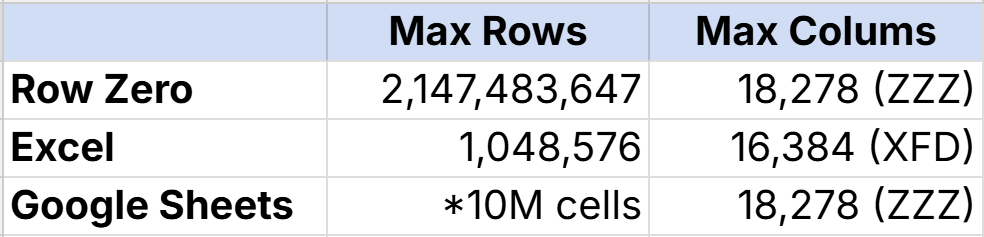
However, legacy spreadsheets like Excel are limited to 1 million rows of data, so if you need wrangle large data sets, you’ll need to use a more powerful spreadsheet like Row Zero or switch to something like python for data wrangling.
In this post, we’ll break down what data wrangling is, how spreadsheets fit into the process, who does it, and why modern cloud spreadsheets like Row Zero are transforming what’s possible. Need to wrangle big data in a spreadsheet?
What is Data Wrangling?
Data wrangling is the process of transforming raw data into a clean, structured format that can be analyzed and used for decision-making.
It typically includes tasks like:
- Cleaning messy or inconsistent data
- Merging data from multiple sources
- Filtering and reshaping datasets
- Creating calculated fields
- Standardizing formats
- Validating accuracy
- Preparing data for reporting or modeling
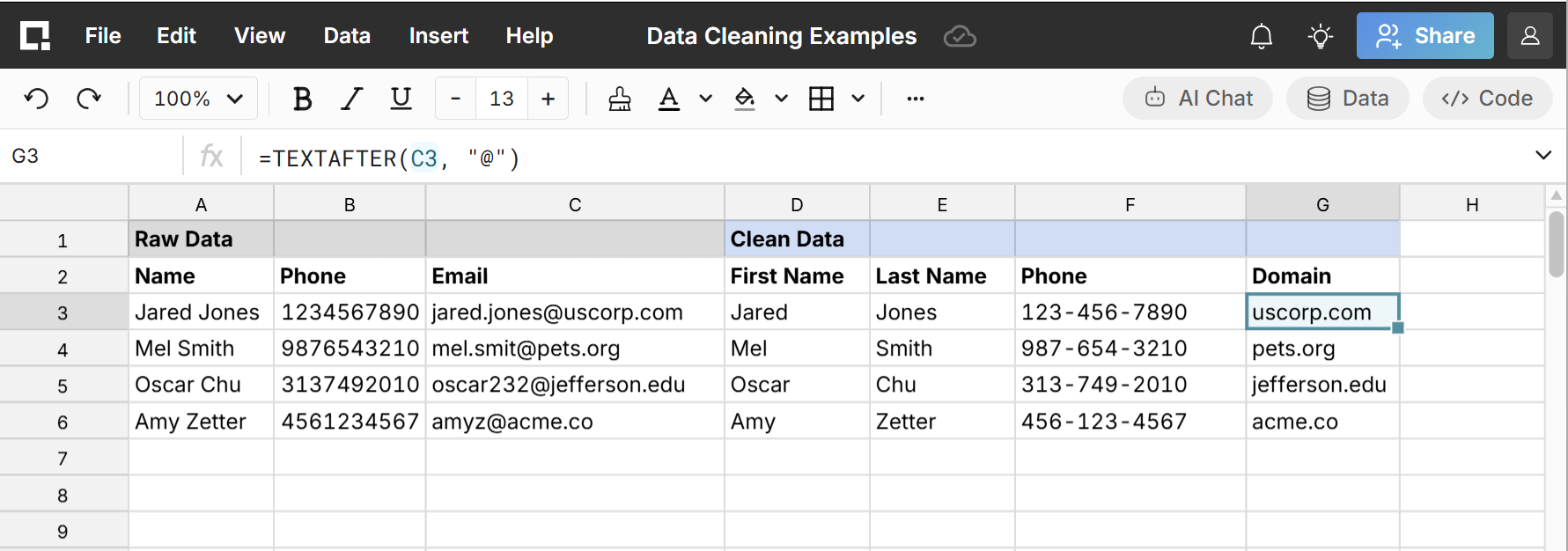
Data wrangling bridges the gap between raw exports and meaningful insight. As you can see, spreadsheets are a great tool for data wrangling, especially when you don’t know where to start and need to explore the data.
You may also hear data wrangling referred to as:
- Data munging
- Data cleaning
- Data shaping
- Data preparation
All of these fall under the broader umbrella of data wrangling and are often used interchangeably.
The Role of Spreadsheets in Data Wrangling
Spreadsheets are the most widely used data wrangling tool in the world.
Even in organizations with modern data warehouses and BI tools, spreadsheets remain the place where data actually gets prepared and analyzed. Why? Because spreadsheets offer:
- Flexibility - Users can quickly manipulate data without writing complex code.
- Visibility - You can see and inspect every row and column directly.
- Speed - Ad hoc analysis and quick transformations are easy.
- Familiarity Nearly every business user already knows how to use them.
As a result, spreadsheets often sit at the center of analytics workflows. Users pull data from databases, clean and shape it, and produce final outputs used by teams, executives, or even other analytics tools.
Big Data Wrangling in Spreadsheets
One of the main reasons teams don’t use a spreadsheet for data wrangling is data size. Legacy spreadsheets like Excel are limited to 1 million rows of data, so data wrangling in Excel is limited to smaller datasets. Historically this pushed teams to write complex code in Python to wrangle data or use specialized data wrangling tools for big data.
Today, teams now use Row Zero spreadsheets to wrangle big data. Row Zero is a modern Excel alternative that makes it easy to wrangle massive datasets in spreadsheets.
Row Zero supports the same data wrangling features as Excel and Google Sheets, like functions, pivot tables, data cleaning features, data validation, conditional formatting, etc. but can also support much larger datasets. View 10 tips for big data cleaning in spreadsheets.
Who Does Data Wrangling?
Data wrangling is not just for data engineers or data scientists. Data wrangling is a common task for nearly every business function:
- Analysts frequently clean and reshape exported data for reporting and modeling or to support business teams they work with.
- Business teams like Finance, Marketing, Sales, Operations, and Customer Success often wrangle data to understand performance, forecast outcomes, and track KPIs.
- Technical teams like data engineers, data scientists, and product managers often use spreadsheets for quick analysis, validation, and exploration. Even though many technical folks could write code to clean data, spreadsheets are often faster and easier.
Generally, if someone works with data, they are likely doing some form of data wrangling, and often in a spreadsheet.
Common Data Wrangling Use Cases
Data wrangling appears in nearly every industry and department. Some common examples include:
Finance & FP&A
- Combining exports from ERP, CRM, and billing systems
- Cleaning and categorizing transactions
- Preparing forecasting models
- Building board and executive reports
Sales & Revenue Operations
- Cleaning CRM exports
- Merging pipeline and usage data
- Territory and quota analysis
- Commission calculations
Marketing
- Campaign performance analysis
- Attribution modeling
- Lead data cleanup and segmentation
- Merging platform exports (ads, web, CRM)
Operations & Supply Chain
- Inventory analysis
- Vendor and logistics reporting
- Demand forecasting
- Data normalization across systems
Industries Where It’s Critical
- Healthcare
- Finance and banking
- Consulting
- Retail and ecommerce
- Manufacturing
- SaaS and technology
Wherever data exists, data wrangling follows.
How Row Zero Enables Modern Data Wrangling
Row Zero was built to solve the limitations of traditional spreadsheets while preserving everything users love about them. It transforms spreadsheets into a modern data wrangling platform.
Work with Big Data — Not Samples
Row Zero supports datasets far beyond traditional spreadsheet limits. Teams can:
- Analyze millions or billions of rows
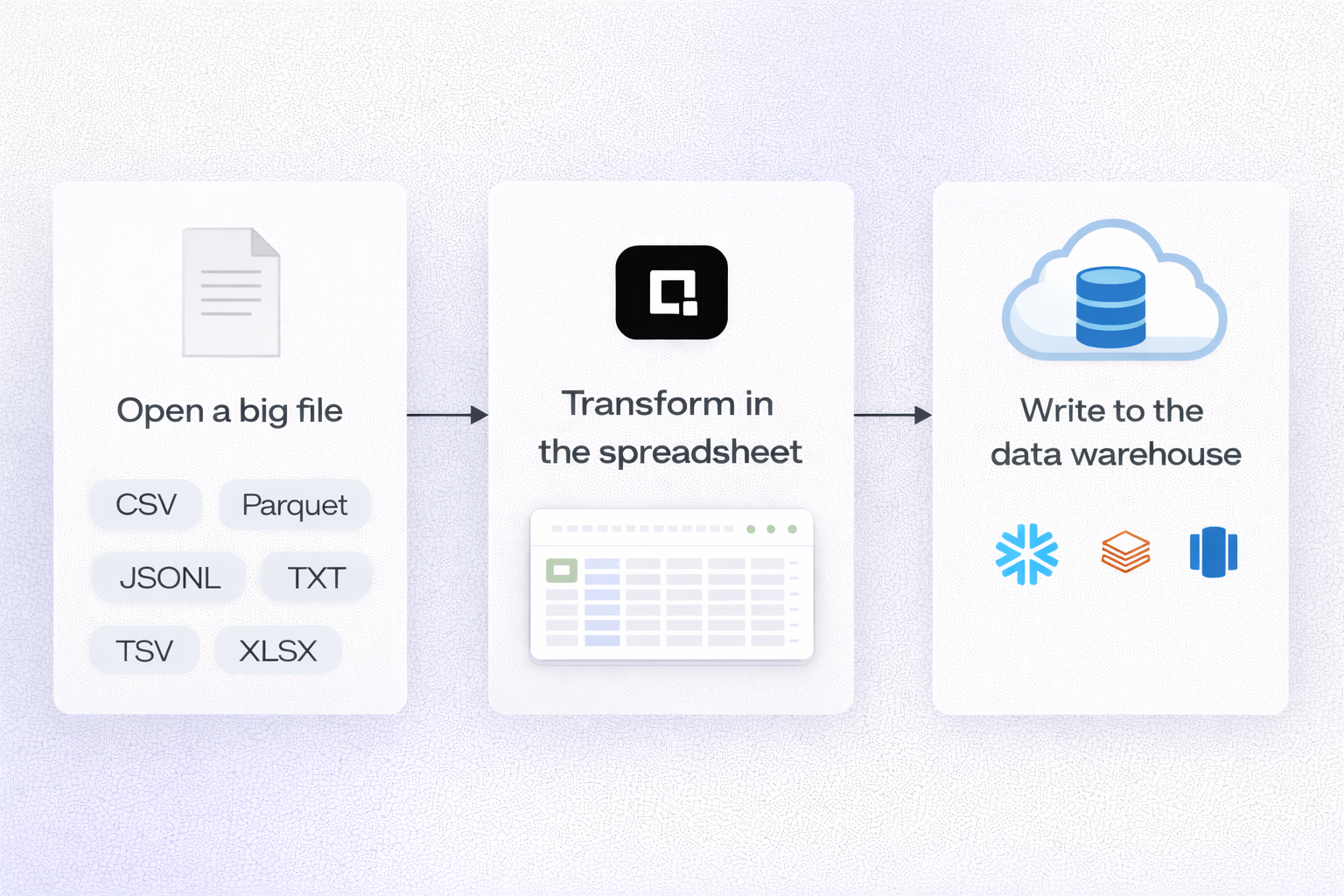
- Open massive CSV or Parquet files instantly
- Work with full datasets instead of samples
- Perform transformations at scale
This enables deeper, more accurate analysis without breaking workflows.
Connect to Live Data Sources
Instead of exporting data into static files, Row Zero connects directly to your cloud data (Snowflake, Databricks, Redshift, Postgres, etc) so you can build connected spreadsheets and automate data wrangling and cleanup.
You can also write-back to your data warehouse directly from the spreadsheet, so you can easily preview and clean data before importing to your data warehouse.
Keep Data Secure and Governed
Row Zero is built for enterprise data security. Spreadsheets can enforce access controls and row-level security so that spreadsheets and data are only accessible to authorized users. Enterprises can restrict downloads, copy/paste, and external sharing so data stays locked in the cloud.
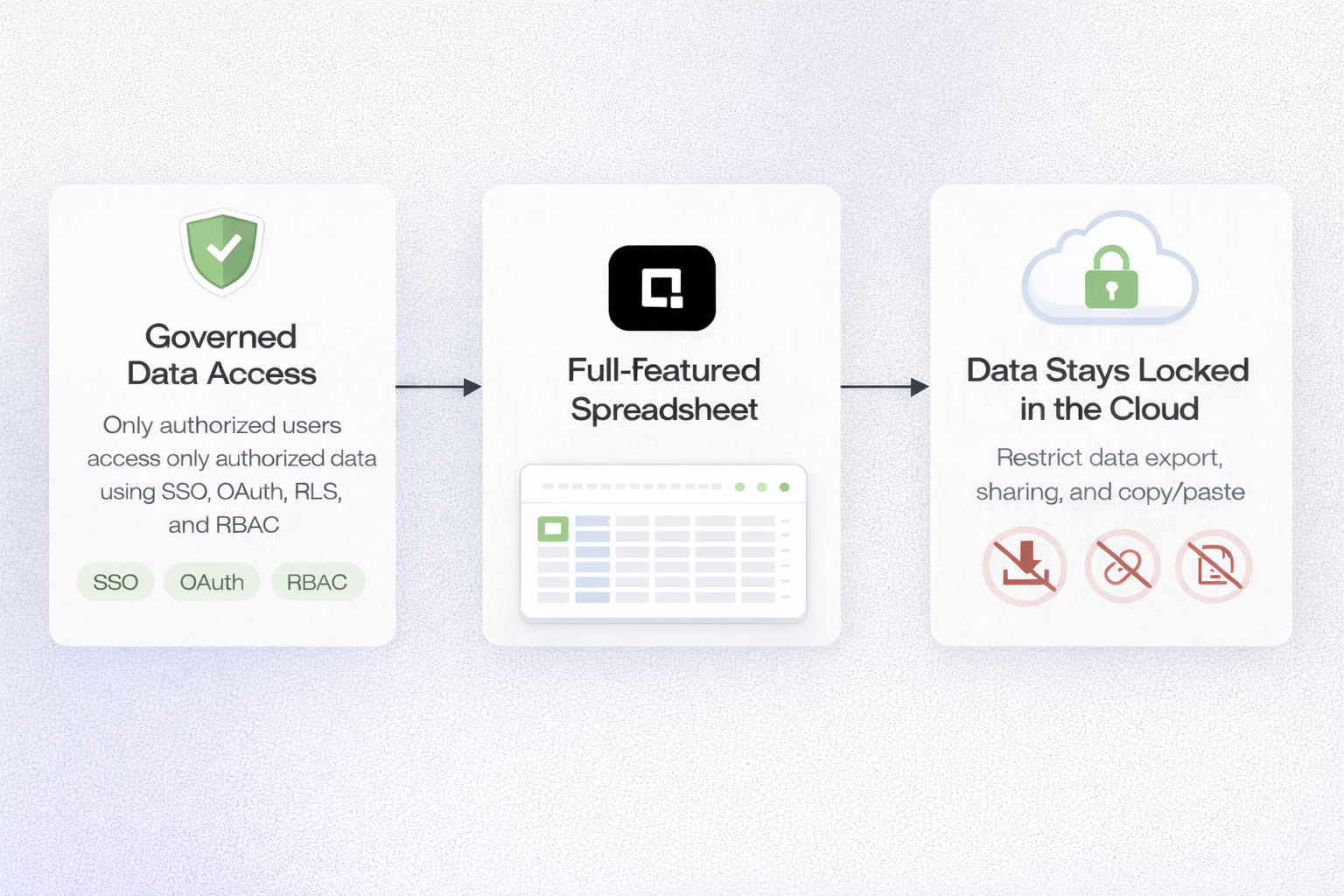
This enables teams to securely wrangle data and do cell level transformations while keeping data secure and governed. When teams connect spreadsheets to their central data source, it eliminates files and data exports from their data wrangling workflows.
Familiar Spreadsheet Experience
Despite its scale and power, Row Zero works like the spreadsheets teams are used to. Users can:
- Use familiar formulas and functions
- Filter, pivot, and transform data
- Build models and reports
- Collaborate in real-time
There’s no need to learn complex new tools or languages. This is why more teams are using Row Zero to wrangle big data.
The Future of Data Wrangling Is Still the Spreadsheet
Data wrangling isn’t going away. If anything, it’s becoming more important as organizations generate more data than ever before. Raw data often needs to be cleaned and transformed and spreadsheets will continue to play a central role because they provide flexibility, accessibility, speed, and transparency.
But modern data requires modern tools. Row Zero brings together the scale of a data warehouse, the governance of enterprise systems, and the usability of a spreadsheet, unlocking a new era of data wrangling where teams can work with massive, secure, live datasets without leaving the spreadsheet environment they already know.