AI Agent
Row Zero’s AI agent can read and analyze your data, create formulas and pivot tables, generate visualizations, and perform complex calculations, all within your workbook. AI-produced analysis is fully auditable and editable, so you can easily investigate the underlying data and tweak the analysis. Additionally, if you use Databricks or Snowflake, Row Zero can connect to Genie and Cortex Analyst to generate a query.
Before you start
Enterprise accounts use a “bring-your-own-key” approach, which allows your organization to retain control over access to the inference provider. The AI runs in your already-vetted cloud services. To use AI in Row Zero, Enterprise customers must configure their AI provider first. See AI admin documentation to learn how.
All other tiers use the Row Zero AI provider.
Spreadsheet tools
To start using Row Zero’s AI agent, click the AI Agent button on the right side of your tool bar.
If your organization has enabled multiple models, you can choose your desired model in the AI Agent window. This option is only available to enterprise customers.
Next, write your first prompt. Row Zero’s AI agent can import data sources, write formulas, create pivot tables and charts, and summarize results. For example, try:
- "Import my data source.”
- "Summarize the trends in this dataset"
- "Create a chart showing sales by month"
- "Add a column that calculates profit margin"
Because Row Zero’s AI agent works with tools in the Row Zero workbook, auditing or revising outputs is simple. You can continue to prompt the AI to take actions in your workbook or pick up where it left off or both.
Threads
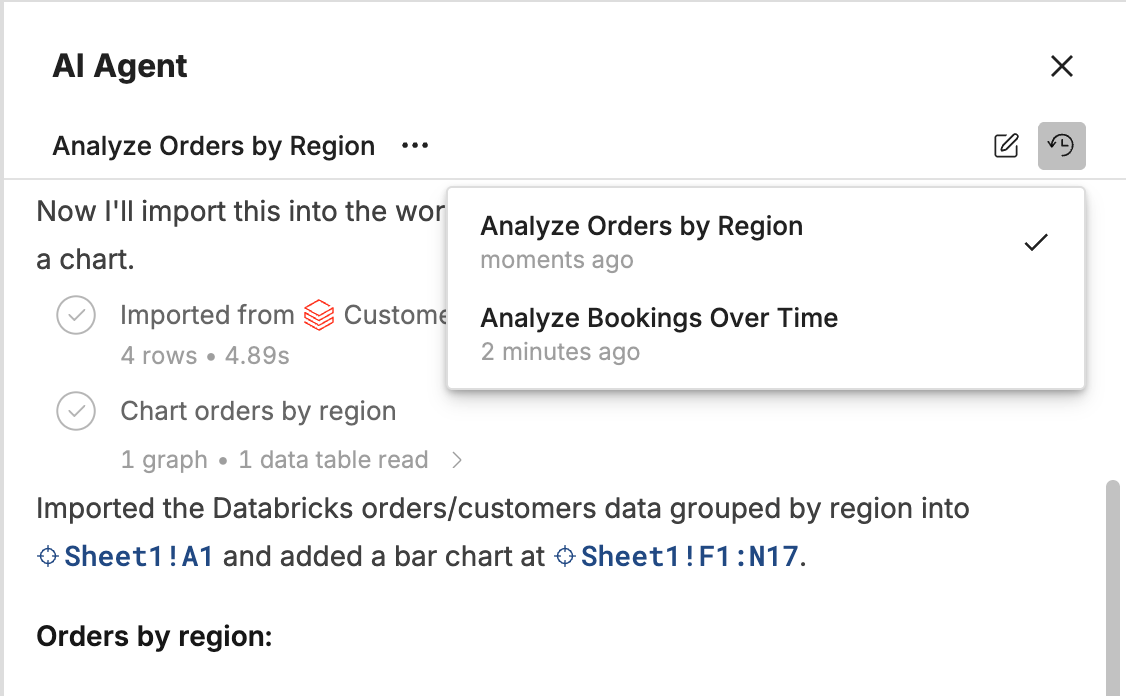
AI Agent conversations are saved as threads that you can leave and come back to.
-
Each workbook can have multiple threads, so separate requests stay separate.
-
Threads are saved with the workbook, so you can leave and continue a conversation later. Copy a link to any thread to jump back to it.
-
Long threads are compacted automatically to stay within the model's context limit.
-
The AI Agent keeps working after you close the workbook, so long runs finish without you.
AI-generated queries
AI-generated queries let Row Zero users ask questions about connected warehouse data in plain language and turn those questions into SQL. Row Zero uses the semantic layer configured in your data platform to generate the query, then brings the result back into Row Zero as a connected table that users can refresh, audit, edit, and build on with formulas, pivot tables, charts, and other spreadsheet workflows.
This is useful when business users know the question they want to answer but do not know the exact schema, join paths, metric definitions, or SQL syntax. Instead of starting from a blank query editor, users can ask a question like "What were total bookings by region last quarter?" and use the generated SQL as a starting point for analysis.
Available Providers
| Provider | Connection Type | Semantic Context |
|---|---|---|
| Databricks Genie | Databricks | Databricks Genie Spaces |
| Snowflake Cortex Analyst | Snowflake | Snowflake Semantic Views |
Databricks Genie is available for Databricks connections and uses Databricks Genie Spaces to understand the data, instructions, and examples for a business domain. Learn how to configure Databricks Genie for Row Zero here.
Snowflake Cortex Analyst is available for Snowflake connections and uses Snowflake semantic views to understand business concepts, metrics, and relationships. Learn how to configure Snowflake Cortex Analyst for Row Zero here.
Note: Enterprise customers must configure a Row Zero AI Agent provider, in addition to the warehouse setup linked above.